How Does API Connectivity Work in Cloud Telephony?
If you’ve ever wondered how a business phone system talks to a CRM, sends an automatic text after a missed call, or triggers a notification the moment someone hangs up, the answer almost always comes down to one thing. Understanding how does API connectivity work in cloud telephony actually explains why modern business phone systems feel so much smarter than the ones from a decade ago.
This isn’t just a technical detail for developers to worry about. Once you see how does API connectivity work in cloud telephony, it becomes obvious why some phone systems feel clunky and disconnected from everything else a business uses, while others just quietly plug into the tools already in place.
What Is API Connectivity in Cloud Telephony?
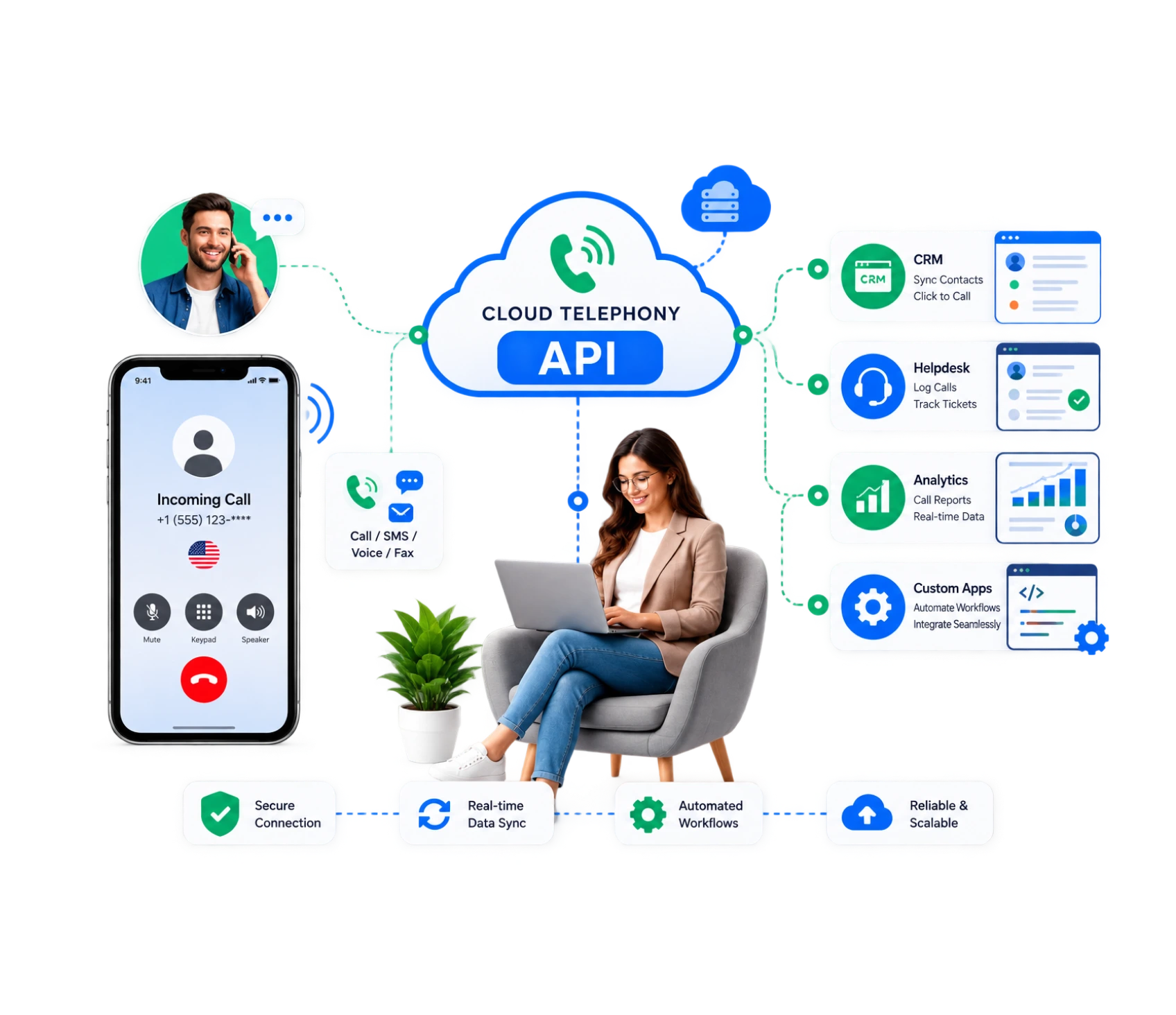
At a basic level, this connection is what lets one piece of software talk to another. In cloud telephony, that means your phone system can send and receive information from other tools, a CRM, a helpdesk, a spreadsheet and without a human manually copying anything over.
A cloud telephony API is essentially the messenger between systems. When a call comes in, it can pass that information, caller ID, call duration, department, straight to whatever tool needs it. A well-built cloud telephony API also handles this exchange securely, so sensitive customer information isn’t just floating between systems unprotected.
Without any of this in place, every piece of call data would just sit inside the phone system, disconnected from everything else the business runs on. That disconnect is exactly what makes people start asking how does API connectivity work in cloud telephony in the first place, usually right after they’ve spent an afternoon manually copying call notes into a spreadsheet.
How Does Cloud Telephony API Integration Work?
At its core, cloud telephony integration works through a set of defined rules that let two systems exchange data safely and predictably, much like a structured conversation where one system asks for information in a specific format and the other responds the same way, every single time. Here’s how that process actually breaks down:
Step 1: An event happens
A call comes in, a text gets sent, or a call goes unanswered, this is what kicks off telephony API integration in the first place.
Step 2: The event gets sent to another system
That trigger travels automatically to wherever it needs to go, a CRM, a helpdesk, or a reporting tool, thanks to telephony API
Step 3: The receiving system reacts
It logs the call, updates a record, or triggers a follow-up action, all without anyone manually transferring data between tools.
Step 4: The flow keeps everything connected & runs through pre-built connections
Since businesses rarely run on just one piece of software, cloud telephony integration is what keeps call data flowing into a CRM. Setting up cloud telephony integration doesn't usually require a full engineering team, most modern platforms let you configure telephony API integration through a dashboard instead of custom code written from scratch.
That last point is a big shift from how this used to work, where any kind of integration meant hiring a developer and waiting weeks for a working connection.
What Can You Do With Telephony APIs?
Once this kind of setup is in place, the possibilities go well beyond just making and receiving calls. It can be used for such things as:
- Records calls to a CRM automatically in real time.
- Triggering follow-up texts after a missed call, without anyone lifting a finger.
- Pulling caller information from an existing database before an agent even answers.
- Sending real-time alerts to a team when specific types of calls come in.
- Recording and storing call data in a system outside the phone platform itself.
None of this happens by accident. Once you understand how does API connectivity work in cloud telephony, all of these small automations start making a lot more sense, they’re just the visible result of information moving quietly between systems.
How Does API Connectivity Automate Business Communication?
This is really where things get interesting. API automation in cloud telephony means actions happen automatically based on triggers, without a person deciding to make them happen every single time. Here’s what that actually looks like in practice:
- A missed call triggers a text: Instead of that call just disappearing, an automatic text goes out apologizing and offering a callback link, all without an agent doing anything.
- A completed call logs itself: The call automatically saves into a CRM with a timestamp and duration, no one has to type it in afterward.
- Repetitive admin work disappears: This kind of API automation in cloud telephony removes the hours of manual logging and note-taking that used to eat up a team’s week.
- The system scales without extra staff: For businesses growing fast, this piece alone tends to save more time than almost any other feature, since API integration for business communication keeps working the same way whether call volume is low or high.
- A phone system starts running itself: It shifts from something people operate constantly into something that mostly runs in the background, only pulling in a human when a real conversation is actually needed.
For anyone trying to picture how does API connectivity work in cloud telephony in practical, everyday terms, this automation layer is usually the clearest answer.
Consider a growing support team that used to log every call by hand at the end of a shift. With proper API automation in cloud telephony in place, that same team can focus entirely on talking to customers, while the system handles the logging, tagging, and record-keeping in real time behind the scenes.
We'd Love to Hear From You
Ready to expand your business globally?
Fill out the form below, and our team will help you choose the perfect number.
How Does API Connectivity Connect CRM and Communication Systems?
One of the most common uses of this technology is linking a phone system directly to a CRM.This connection will automatically create that link without having to manually record who called and what was discussed.
If a call comes in, the system can query the CRM to see if there is an existing contact, retrieve their history and present it to the agent before he or she picks up the phone. When the call is completed the result is automatically added back to the same CRM record. This removes the need to manually enter or use a separate integration tool to connect a phone system to a business’s real customer information.
What Are the Benefits of API Connectivity for Businesses?
The benefits of API Connectivity for Businesses include:
- Less manual work: Data just moves between systems automatically so that nobody’s sitting there copying it over by hand or manual work.
- Fewer mistakes: When the system logs things automatically, you skip the typos and missed details that come with typing everything in yourself.
- Faster response times: Something like a follow-up text goes out the second it’s triggered, not whenever someone happens to notice and get around to it.
- A clearer picture overall: Once call data starts flowing into a CRM or reporting tool, you actually see what’s going on across the business instead of guessing.
- Growth that doesn’t get messy: As call volume climbs, API integration for business communication keeps everything organized without needing to throw more admin staff at the problem.
Businesses that put this in place early tend to avoid a painful scramble later, since retrofitting API integration for business communication onto an already-growing team is a lot harder than building it in from the start. Combined with proper API automation in cloud telephony, these benefits compound over time rather than staying flat as the business grows.
Supporting IoT and Real-Time Communication
Beyond typical business use, this same kind of connectivity increasingly shows up in IoT and device-based setups too. A smart device, a sensor, or a connected system can trigger a voice alert or a call the moment something needs attention, using the exact same principles behind a standard cloud telephony API.
This matters for businesses managing physical infrastructure, shipping, security, equipment monitoring, where a real-time alert triggered through a phone call or voice message can be far more effective than an email nobody checks in time. The same logic behind how API connectivity works in cloud telephony for a CRM applies just as well to a sensor triggering an automated call when something goes wrong.
This kind of cloud telephony integration extends well past the office phone. A warehouse sensor detecting a temperature spike, a security system flagging unusual activity, or a piece of equipment nearing failure can all use the same underlying connection to trigger an immediate voice alert, giving someone a heads-up long before the problem becomes a bigger one.
Getting Started Without Overcomplicating It
For most businesses, the hardest part isn’t understanding the concept, it’s knowing where to start. The good news is that solid API integration for business communication rarely requires building anything from scratch anymore. Most providers offer ready-made connections to the tools businesses already rely on, CRMs, ticketing systems, messaging platforms, so the setup process looks more like flipping a switch than writing code.
That said, it’s worth being deliberate about what actually needs connecting first. Trying to automate everything at once tends to create more confusion than it solves. Starting with the highest-impact connection, usually CRM logging or missed-call follow-ups, gives a business a clear win early, before expanding into more advanced automation later on.
Why Dialinger Fits Into This
If you’re evaluating providers, Dialinger’s API integration platform is built specifically around this kind of setup, connecting your phone system to the tools you already use without a complicated process. For CRM-specific needs, Dialinger’s CRM app integration links call data directly into your existing customer records automatically without any manual entry required.
For businesses working with connected devices, Dialinger’s voice alert triggers extend this same connectivity into IoT and real-time alerting setups. If SMS automation is part of your workflow, the SMS API integration feature covers that ground too. You can book a demo to see exactly how it fits your existing systems before committing to anything.
At the end of the day, understanding how does API connectivity work in cloud telephony isn’t about becoming a developer. It’s about knowing why some phone systems just quietly work with everything else your business runs on, while others leave you copying information by hand every single day.
Frequently Asked Questions (FAQs)
How does API connectivity actually work in cloud telephony?
Honestly, it’s just your phone system talking to the other tools you already use, a CRM, a helpdesk, whatever, without you copying anything over by hand.
Do I need to hire a developer for cloud telephony integration?
Not anymore, really. Most platforms just let you click through a dashboard to set up telephony API integration instead of writing any code.
Is API integration for business communication really worth it for a small team, or just big companies?
Small teams get just as much out of it honestly, maybe more, since nobody on a small team has time to sit around logging calls by hand.
What's actually different here versus just having a normal phone system?
A normal phone system just rings and connects calls. This stuff makes that call actually mean something to the rest of your business.



