Live Call Monitoring Software for Real-Time Supervision
Most sales and support managers have sat through the same frustrating cycle at some point. A customer complains about how a call went, and by the time anyone actually looks into it, the details are fuzzy, the recording’s buried somewhere, and nobody remembers exactly what was said. Live call monitoring software exists to fix that gap, letting a manager actually hear what’s happening while it’s happening, not days later when it’s too late to help.
This isn’t about micromanaging every single call a rep makes. It’s about catching problems while they’re still fixable, coaching in the moment instead of after the damage is done, and actually knowing what’s going on across a team instead of guessing.
What Is Live Call Monitoring Software?
At its core, live call monitoring software lets a manager or supervisor listen to a call as it’s happening, in real time, without the rep or the customer necessarily knowing. Some setups also allow whispering a quiet tip to the rep mid-call, or barging in entirely if a conversation is going sideways fast.
This is different from just pulling up a recorded call afterward. Recordings are useful for training and reviewing patterns over time, but they can’t stop a bad call from happening. Live call monitoring software catches things as they unfold, which matters a lot more than it sounds like on paper, especially for a new hire who’s still finding their footing on live calls.
How Does It Actually Work?
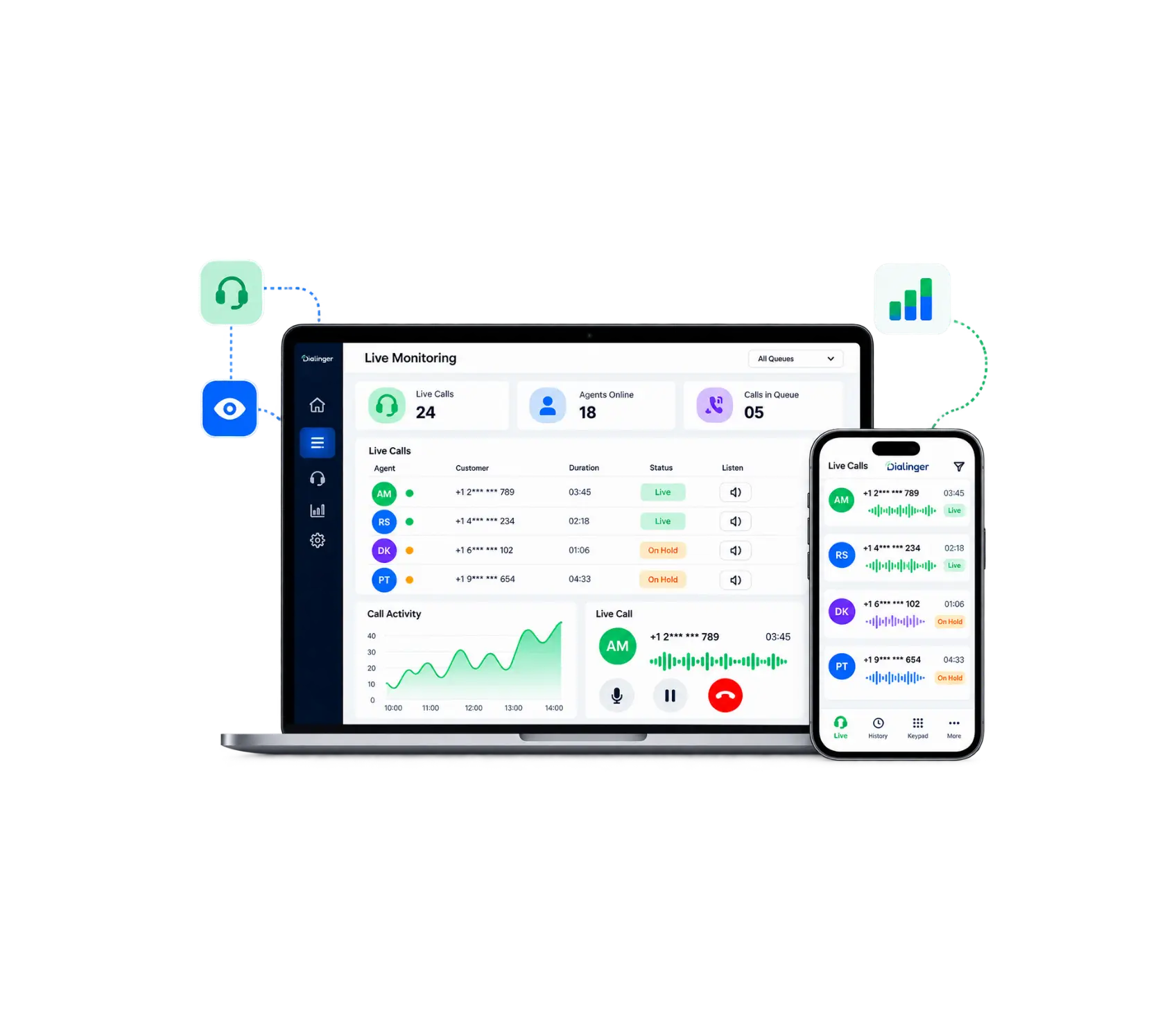
The mechanics are simpler than people expect. Once live call monitoring software is set up, a supervisor’s dashboard shows which calls are currently active across the team. They can click into any one of them and start listening instantly, without the call being interrupted or either party hearing a click or beep.From there, a few things are usually possible depending on the platform:
- Listen only: Staying completely silent while observing the call.
- Whisper mode: Where the supervisor can speak directly to the rep without the customer hearing anything.
- Barge in: Jumping into the conversation fully if something needs immediate intervention.
Most platforms also log which calls were monitored and when, so there’s a record of coaching activity over time, not just a one-off glance here and there. That log ends up being useful for its own reasons too, showing managers whether monitoring is actually happening consistently across the team, or whether it’s quietly slipping during busy weeks.
Why Does Call Monitoring Software Matter for Growing Teams?
As a team grows past a handful of people, a manager physically can’t sit next to every rep anymore. This is exactly where call monitoring software earns its place. It gives a manager visibility into calls happening across an entire floor, or across remote reps scattered in different cities, without needing to be physically present for any of it.
For new hires specifically, this changes the ramp-up period significantly. Instead of shadowing a manager for a week and then being thrown into calls alone, a new rep can be actively coached through their first real calls, with a supervisor stepping in only when needed rather than hovering the whole time. That balance tends to build confidence faster than either extreme, constant oversight or none at all. Good call monitoring software makes that kind of gradual independence possible without leaving a new hire completely unsupported.
Live Call Monitoring Feature of Dialinger
We'd Love to Hear From You
Ready to expand your business globally?
Fill out the form below, and our team will help you choose the perfect number.
Is Real-Time Call Monitoring Better Than Reviewing Recordings Later?
It’s worth understanding the real difference here, since a lot of teams assume call recordings alone cover this need. Real-time call monitoring catches a problem while it’s still happening, letting a supervisor step in before a customer hangs up frustrated or a deal falls apart over a preventable misunderstanding.
Recorded calls are still valuable, don’t get that wrong. They’re great for spotting patterns over weeks or months, building training materials, or reviewing a specific complaint after the fact. But real-time call monitoring is the only version of this that can actually change the outcome of the call happening right now. One catches problems in the moment, the other explains what already went wrong.
Most solid setups use both together. Real-time call monitoring handles live coaching and intervention, while recordings handle longer-term training and quality review.
What Should You Look for in Call Center Monitoring Software?
Not every platform handles this the same way, and picking the wrong one can leave a team with visibility that looks good on paper but doesn’t actually help day to day. A few things worth checking before committing to call center monitoring software:
Silent Listening
Listening without interrupting the conversation and without alerting the client.
Whisper and barge-in options
Whisper and barge in options to allow supervisors flexibility depending on the situation.
Dashboard visibility
Not only historical, but also real-time Dashboard visibility to the active calls.
Coaching notes tied to specific calls
Feedback is attached to individual calls, so it isn't lost or forgotten between shifts.
Call center monitoring software that only offers passive recording without any live component tends to fall short for teams that actually need to intervene in real time, not just review things after the fact. The best call center monitoring software treats live listening as the core feature, not an afterthought bolted onto a recording tool.
How Do You Get Users Comfortable With Being Monitored?
There’s an honest challenge worth addressing here: not every rep loves the idea of someone listening in. If it’s introduced badly, it can feel like surveillance rather than support, and that resistance quietly undermines the whole point of having this in place.
The teams that get this right tend to frame it clearly from day one. Monitoring exists to help users get better and to catch problems before they become bigger, not to catch people making mistakes. Being upfront about when and why monitoring happens, and pairing it consistently with constructive feedback rather than criticism, tends to turn skepticism into something users actually value over time. A rep who gets useful, specific coaching from a monitored call usually stops seeing it as intrusive and starts seeing it as genuinely helpful.
What Mistakes Should You Avoid When Setting This Up?
A few patterns show up again and again in teams that don’t get the full value out of live call monitoring software:
Monitoring without ever coaching
Listening to calls without following up with feedback wastes most of the benefit.
Only checking in during obvious problems
Waiting until a complaint comes in means missing dozens of smaller coachable moments along the way.
Treating it as surveillance instead of support
Users tend to disengage if monitoring feels punitive rather than developmental.
Ignoring the data over time
A single call snapshot means less than patterns tracked across weeks.
Avoiding these mistakes usually comes down to building monitoring into a regular rhythm rather than treating it as an occasional check-in. The right call monitoring software makes that rhythm easy to maintain instead of something that quietly falls off after the first busy week.
How Do You Choose the Right Platform?
If you’re evaluating options, Dialinger live call monitoring feature covers the core of what a growing team actually needs, real-time listening, whisper coaching, and the ability to step into a call directly when something needs immediate attention. It’s built to give supervisors visibility without disrupting the actual conversation happening on the line.
For teams that also want structured reporting on top of live monitoring, Dialinger call analytics feature tracks the broader patterns, call volume, response times, and performance trends over time, so coaching decisions aren’t based on gut feeling alone. If you’re running a larger support or sales operation, the virtual call center solution brings monitoring, routing, and reporting together under one dashboard. You can book a demo to see how it actually runs before making any decision.
At the end of the day, live call monitoring software isn’t about catching people doing something wrong. It’s about giving a team the chance to fix a rough call before it turns into a lost customer, and giving new users the kind of real-time support that actually helps them get better, faster.
Frequently Asked Questions (FAQs)
What is live call monitoring software?
It’s basically a way for a manager to listen in on a call while it’s actually happening, not after the fact when it’s too late to fix anything.
Does this slow down or interrupt the call in any way?
No, the whole point is that it runs quietly in the background. The call keeps going like normal the entire time.
Is this the same thing as call recording?
Not really. Recordings show you what already happened. This lets you actually catch a problem while it's still fixable.
Do small teams actually need this, or is it just for big call centers?
Even a small team benefits, honestly. A five-person team still has new users who need real-time coaching just as much as a big floor does.



