Voicemail Transcription Turn Audio Into Actionable Text
If you’ve ever sat in a meeting and watched a call slide into voicemail, you know the small dread that follows: will you actually remember to check it later, or will it sit unread until the caller follows up somewhere else? Voicemail transcription solves that exact problem by turning spoken messages into readable text you can scan in a few seconds. Instead of dialing into your mailbox, sitting through the greeting, and replaying a message twice just to catch a callback number, it puts the words right in front of you. For busy teams juggling dozens of calls a day, that small shift changes how fast people respond to customers, leads, and coworkers.
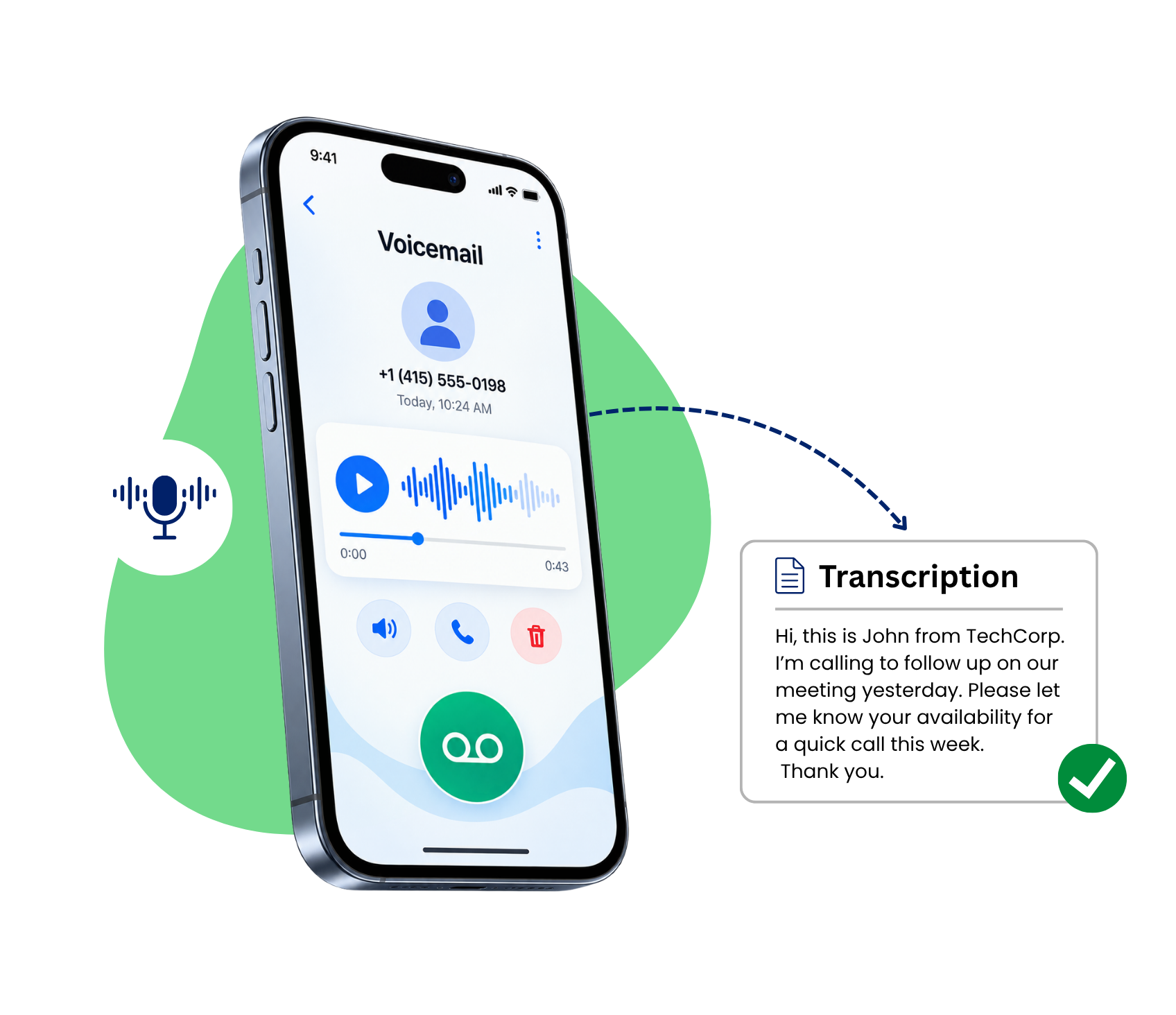
What Is Voicemail Transcription and How does it work?
It’s the process or method of converting a person’s spoken message into written text using speech-to-text technology. When someone leaves you a voicemail, the system listens to the recording, processes the spoken words, and delivers a text version straight to your phone, inbox, or dashboard.It doesn’t replace the audio file; it sits alongside it, so you can read the gist of a message in passing and only play the recording back if you need the tone, urgency, or fine details a transcript might miss.
Modern transcription service runs on automatic speech recognition (ASR), technology trained to recognize accents, background noise, and everyday phrasing rather than robotic, scripted speech.Here’s the general flow behind it:
1:A caller leaves a voicemail when you’re unavailable to pick up.
2:The recording is processed through a transcription engine within seconds to a couple of minutes.
3: The written version is delivered as a text or push notification, usually alongside the original audio.
4:You can search, forward, or archive the transcript just like any other message in your inbox.
This means it isn’t just about convenience; it also creates a searchable record you can reference weeks later without digging through old recordings one by one.
We'd Love to Hear From You
Comparing Free Voicemail Transcription vs. Paid Voicemail Transcription Software
Plenty of carriers and apps advertise free voicemail transcription, and for casual, personal use, that’s often good enough. But free voicemail transcription tools tend to cut corners: accuracy drops with accents, industry jargon, or noisy call lines, and you rarely get extras like multi-language support or CRM integration. Businesses that lean on voicemail for sales calls, support tickets, or client updates usually outgrow it fairly fast.
That’s where dedicated voicemail transcription software comes in. Paid platforms invest in stronger speech models, so what you get back is more accurate, better formatted, and delivered quicker. If your team depends on voicemail daily, moving from a bare-bones free voicemail transcription add-on to a proper paid platform usually pays for itself in saved time alone.
How to Choose the Right Voicemail Transcription Service
Choosing a right service isn’t just about picking the first option that shows up in an app store search. Pay attention to accuracy rates, available languages, and the method of delivering the transcripts: via email, SMS, or in-app dashboard. A good voicemail transcription service should also integrate with the tools your staff already use, such as a CRM system or helpdesk, which means that voicemail messages will not end up in another inbox.
Security matters just as much. Ask any voicemail transcription service how long they store audio and text data, and whether that data is encrypted both in transit and at rest. For regulated industries like healthcare or legal services, this isn’t optional; it’s a compliance requirement. Handled poorly, it can create more risk for a business than the convenience is worth.
How to Enable Voicemail Transcription
Turning it on usually takes just a few steps, whether you’re using a carrier feature or a dedicated business phone system like Dialinger.
Step 1: Check Your Plan or App Settings
Confirm your phone system or carrier actually supports transcription in the first place; not every plan includes it by default.
Step 2: Select The Feature and Turn It On
Check your voicemail and notification settings, and activate transcription mode. In most business phone systems, such as Dialinger, this is found in the voicemail settings menu as a toggle.
Step 3: Choose Your Delivery Method
Choose whether to receive transcripts via email, SMS, or display them inside your dashboard next to the original recording.
After it is configured, all new voicemail messages are delivered as text going forward, and no additional actions are necessary on subsequent calls.
What to Look for in Voicemail Transcription Software
Beyond basic accuracy, the best voicemail software offers a few extras worth checking for: speaker labeling, timestamped text, keyword search across old messages, and syncing across every device your team uses. Some tools also flag urgent-sounding messages using simple tone cues, which helps support teams decide who to call back first.
Transcription that’s built directly into a full business phone system, rather than bolted on as a side app, tends to work more reliably. Messages sync automatically, notifications land where your team already works, and nobody has to juggle a separate app just to read a few lines of text.
Benefits of Voicemail Transcription for Growing Teams
It saves time, but the real benefits stretch further for growing businesses:
- Faster response times, since staff can skim a transcript instead of listening end-to-end
- Searchable records that help with training, compliance, or resolving a dispute later
- Better accessibility for team members who are hard of hearing or working in loud environments
- Easier handoffs, since transcripts can be copied straight into tickets, CRMs, or shared team threads
For remote and hybrid teams especially, this turns voicemail from a chore into just another normal part of the workflow.
How to See Transcript of Voicemail Messages in Real Time
Once enabled, team members often ask how to see transcripts of voicemail records during their daily workflow. Dialinger offers multiple convenient viewing formats:
- The Unified CallBox: Open your Dialinger mobile or desktop application. Choose and tap the voicemail inbox icon to read transcripts with incoming call logs and SMS messages.
- Email Inboxes: Check your work email. All transcripts are automatically converted to readable text with call time and caller ID information.
- Push Notifications: Instant mobile alerts or notifications display the first few lines of your voicemail transcript right on your device’s lock screen.
Whether you are wondering how to turn on voicemail transcription for personal extensions or trying to work out how to activate it for an entire enterprise team, Dialinger handles the technical heavy lifting so you can focus on customer service.
Frequently Asked Questions (FAQs)
What Is Voicemail Transcription?
It is the automatic process of converting a voice message to text, which is supplied at the same time as or as an alternative to the voice message.
How Do I Turn On Voicemail Transcription?
Move to your voicemail settings and enable the transcription toggle. Most modern business phone systems, including Dialinger, support this natively without any extra installs.
How Do You Get Voicemail Transcription?
You get it by activating the feature inside your provider’s settings, or by switching to a phone system that includes it by default; no separate download required in most cases.
How Do I See a Transcript of a Voicemail?
Once enabled, the transcript usually appears right under the voicemail entry in your call log or inbox, so you don’t need to open a separate app just to read it.



