What is a progressive dialer? Features & How It Works
If you’ve ever watched a sales rep waste half their shift just dialing numbers one by one, waiting for someone to pick up, you already know why dialing technology exists. A Progressive Dialer is one of the smartest answers to that problem. It’s a type of auto dialer system that calls the next number automatically the moment an agent finishes their current call, so there’s no dead time sitting around waiting to dial.
In this solution, we’ll break down what it is, the different types out there, its features, benefits, real use cases, and how it stacks up against other dialers like predictive, preview, and power dialers.

What Is a Progressive Dialer?
It is a calling tool that automatically places the next call as soon as an agent wraps up their previous one. Unlike manual dialing, agents don’t have to punch in numbers or click “call” themselves. The system handles it. And unlike some other auto dialer system setups, it only dials one number per available agent at a time, which means there’s no risk of a customer picking up and hearing dead air because no rep was ready.
This one for one call ratio is really what sets it apart. It moves fast, but it doesn’t sacrifice quality for speed.
Types of It
Not every version of this dialer works the same way. Here are the common ones businesses run into:
- Standard setup: Dials one number right after an agent finishes a call, based purely on who’s available.
- List based dialing: Dials numbers from a pre loaded contact list, in a specific order, which is suitable for an organized outbound call list.
- Skill Based Routing: Ensures that the right agent receives the right call based on their skills or specialties.
- Cloud hosted version: This version is available online and teams can dial from anywhere without having to keep any hardware at their location.
How a Progressive Dialer Works
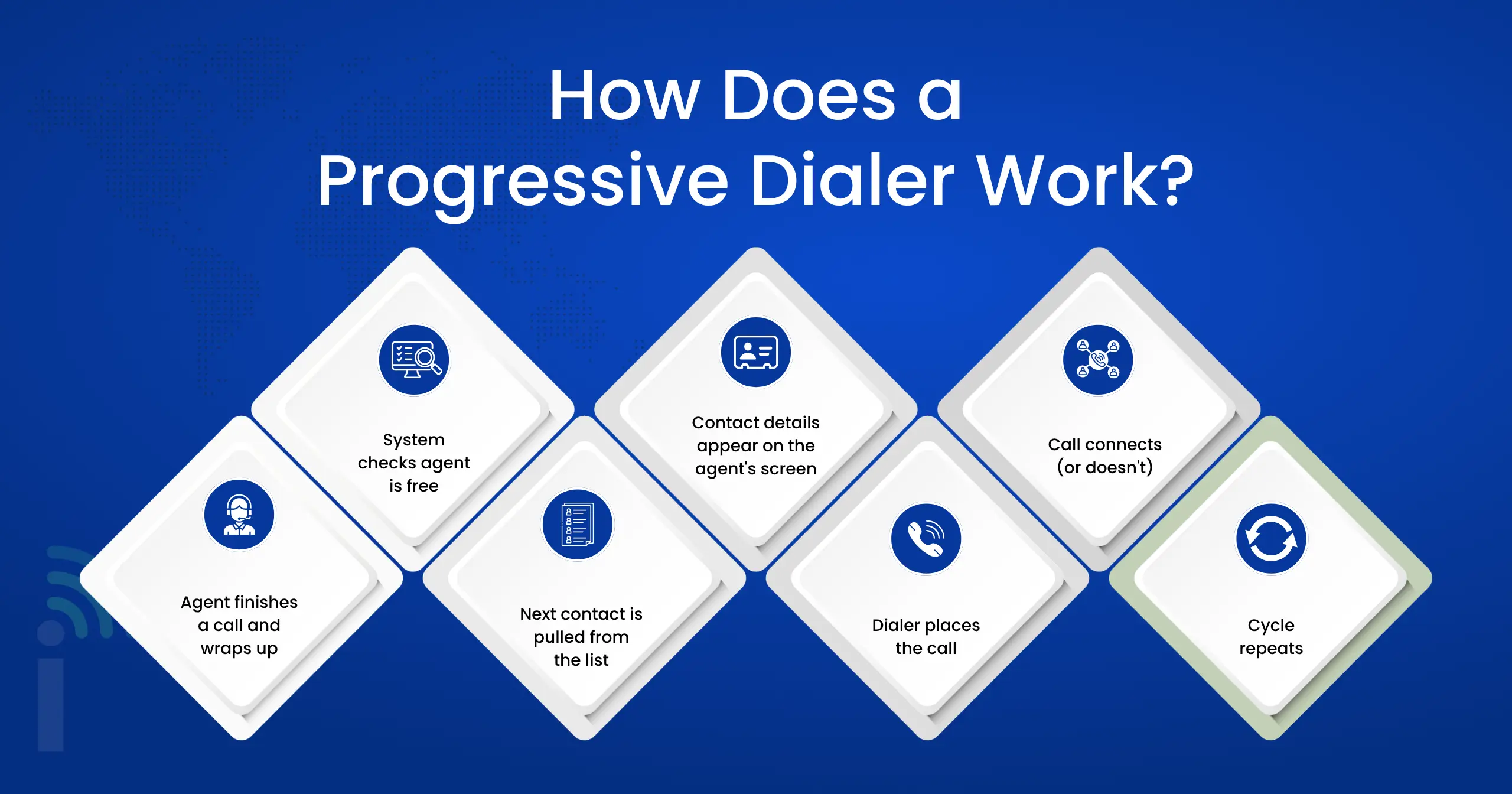
Here’s the everyday flow in plain steps:
- Agent finishes a call and wraps up
The agent ends the conversation, adds notes or selects a call outcome (disposition), and marks themselves as ready/available. - System checks agent is free
The dialer waits until it confirms the agent is actually available — no guessing or predicting. - Next contact is pulled from the list
It automatically picks the next number from the campaign or CRM list (based on rules, priority, or order). - Contact details appear on the agent’s screen
Name, company, history, notes, and other info show up so the agent has context. - Dialer places the call
It dials that one number automatically. The agent doesn’t have to type or press anything. - Call connects (or doesn’t)
If someone answers → agent is already there and starts talking right away, If no answer, busy, or voicemail → agent logs the result and the system moves on. - Cycle repeats
Once the agent finishes and is ready again, the dialer immediately prepares the next contact. No manual dialing, no long idle waits.
Features of a Progressive Dialer
- Automatic call dialing: When an agent is ready, the system dials automatically, so you don’t have to enter a number.
- Screen pop with caller info: Agents see the customer’s name and info pulled from the CRM before the call connects, so they’re never going in blind
- Call disposition tracking: Agents can log the outcome of every call (interested, callback, not reachable) which keeps records clean and campaigns organized.
- Filter Lists:Numbers on lists of restricted numbers are automatically skipped so campaigns remain compliant without manual checking.
- Real time reporting dashboard: Managers can view call activity as it happens, instead of waiting for end of day reports.
- Voicemail detection: The system can detect when a call goes to voicemail, and skip it, saving agents time from dead-end calls.
- Call recording: All conversations are recorded, either for training, quality checks or dispute resolution later.
- CRM and auto dialer system integration: Integrate with your CRM so that each and every call, note, and result is automatically linked back to the right customer profile.
What Are the Benefits of Using It?
Once a team starts using this kind of setup, a few things tend to improve almost right away.
- Less idle time between calls: Agents move straight from one conversation to the next with almost no waiting in between.
- Higher call volume per shift:The system does the dialing so you can make more calls in the same working hours.
- Fewer dropped or abandoned calls: Because the system only connects when an agent is ready, it’s rare that customers end up talking to nobody.
- Better customer experience:When someone answers, an agent is already right there on the line. No weird silence, no “hello… hello?” moment that makes people hang up.
- Improved compliance:Numbers are automatically blocked that shouldn’t be called, avoiding the time, cost and risk of errors.
- Automatic reporting: Managers receive actual numbers not estimates. The log of each call is automatically recorded, so you can see what is going on and have no need for guess work.
- Fewer steps for new agents to learn: New agents don’t need to memorize complex dialing codes or procedures. The technical part is taken care of by the system, and they can immediately engage in discussions with individuals.
- Scalable outbound campaigns:Outbound campaigns that can be scaled up – meaning teams can grow their calling without hiring up to the max.
We'd Love to Hear From You
Ready to expand your business globally?
Fill out the form below, and our team will help you choose the perfect number.
Use Cases of Progressive Dialers
Sales outreach campaigns
When a sales team is working through a fresh batch of leads, timing matters a lot. This tool keeps reps moving from one conversation to the next without any awkward gap in between. The moment a rep wraps up a call, the system already has the next lead ready, screen pop included. That kind of speed can be the difference between catching someone while they're still interested and losing them to a competitor who called first.
Debt collection and follow ups
This industry runs on strict compliance rules, and this kind of setup fits well because of its built in safeguards. Agencies need to reach a high number of accounts daily while staying within contact regulations. A system that filters out restricted numbers automatically takes a lot of that risk off an agent's plate, keeping the pace fast without triggering the silent or abandoned calls that cause compliance headaches.
Customer surveys and feedback calls
Gathering feedback over the phone usually means working through a long list of past customers, and doing that manually eats up hours that could go elsewhere. With this kind of dialer, a team can move through hundreds of contacts in a day without wasting time dialing or waiting. Since calls only connect once an agent is free, customers get someone ready to talk immediately, which tends to produce better quality responses.
Appointment confirmations and reminders
Missed appointments cost clinics, salons, and service businesses real money, often just because nobody got around to calling in time. This tool makes it realistic to confirm every upcoming appointment without pulling staff away from other work all day. Front desk teams can work through the full appointment list efficiently, and that directly cuts down on no shows while keeping the schedule running smoothly.
When Should You Use a Progressive Dialer?
This tool makes the most sense when call quality matters as much as call volume. If your team handles warm leads, sensitive conversations, or anything where a customer shouldn’t hear silence before an agent speaks, a progressive dialer is the safer choice. It’s also a good fit for smaller or mid sized teams that want speed without the compliance risks that come with more aggressive dialing methods.
Progressive vs Predictive Dialer
The biggest difference comes down to how calls get placed. A progressive dialer only calls one number per available agent, so there’s basically no chance of a customer answering with nobody on the line. A predictive dialer, however, dials multiple numbers simultaneously, depending on statistical predictions of agent’s availability. It’s designed for speed and volume, which means that it ensures that some calls are answered without an agent being available, resulting in dropped or silent calls. If compliance and customer experience matter more to your team than raw call volume, this option usually wins out over a predictive dialer. But if you’re running huge outbound campaigns where speed is the priority above everything else, a predictive dialer might make more sense.
Progressive vs Preview Dialer
Here the difference is really about control. A preview dialer gives agents a chance to look at customer details before the call even starts, and the agent manually decides when to dial. That’s great for complex or high value conversations where preparation matters a lot. A progressive dialer skips that pause. It dials automatically when the agent is free, trading a bit of prep time for speed. If your team needs more research before each call, a preview dialer fits better. If speed and volume matter more, this tool takes the lead over a preview dialer.
Progressive vs Power Dialer
A power dialer sits somewhere in between manual and fully automatic dialing. It calls through a list quickly but sometimes dials more than one number per agent, working a bit like a lighter version of a predictive dialer. A progressive dialer is strictly one to one which makes it more predictable and safer for overall customer experience. This is the option most used by businesses that want fast dialing but still want to reduce the risk of abandoned calls, especially in industries where compliance standards are strict.
How to Measure Progressive Dialer Performance
Once your team is using one, here’s how to know if it’s actually working:
- Calls per agent per hour: Just look at how many real conversations each rep is getting through in an hour. If the number feels healthy and consistent, the dialer is keeping things moving.
- Contact rate: This is simply how often the phone actually gets picked up by a real person instead of going to voicemail or ringing out. Higher is better.
- Call abandonment rate: With a progressive dialer this should stay super low. If you start seeing calls drop or people hanging up before an agent answers, something’s off.
- Average handle time: What is the average time agents are spending per call? It can let you know if conversations are effective or prolonged.
- Conversion rate: Of the calls that connect, how many result in a sale, sign-up or whatever action you are looking for? This is the actual “is it working?” number.
- Agent idle time: Check the gaps between calls. A good progressive dialer keeps those quiet moments short so agents aren’t sitting around waiting.
- First call resolution rate: A metrics that is helpful for support teams – the number of issues that are completely resolved on the first call without the need for a follow-up call?
- Voicemail detection accuracy: Is it effective in detecting voicemails and skipping them for agents to not listen to a voicemail?
- Compliance violation count: Monitor the number of times a dialer is close to (or even exceeds) do-not-call compliance rules or other rules. This should be as low as possible.
- Customer scores on satisfaction with the experience: Do customers rate their experience after the call as good? When customers are happy, it’s most likely the dialer is reaching the right people at the right time.
Dialinger for Effective Dialing
If you’re ready to actually put a progressive dialer to work, Dialinger brings everything together in one place: smart call routing, CRM syncing, real time reporting, and a reliable auto dialer system built for teams that care about both speed and customer experience. Instead of juggling separate tools for dialing, tracking, and reporting, Dialinger keeps it all in one dashboard, so your team spends less time managing software and more time actually talking to customers.
Whether you’re running a sales floor, a support desk, or an outreach campaign, a progressive through Dialinger helps your team dial smarter, stay compliant, and connect with more people, without the dead air.
Frequently Asked Questions (FAQs)
What's a progressive dialer?
Okay, so instead of a rep sitting there typing in numbers and hoping someone answers, the software just does it for them. As soon as an agent hangs up from one call, the next one starts dialing on its own. It’s a type of auto dialer system, sure, but the key thing is it only calls one number per free agent at a time. That way nobody ever picks up the phone and hears nothing.
Progressive or preview dialer, which one's better?
Depends what you’re doing, really. A preview dialer lets agents check out the customer’s info first and decide when they want to hit dial, which is handy for calls that need a bit of prep. Progressive doesn’t give you that pause, it just goes. So if your calls need research beforehand, preview’s probably the move. If you just want to move fast, go progressive.
What about a power dialer, how's that different?
Power dialers are a little more aggressive, honestly. Sometimes they'll dial more than one number per agent, so it's kind of a toned down version of predictive dialing. Progressive keeps it strictly one to one the whole time, which just makes it more predictable and a lot less likely to leave someone hanging on a call nobody's there to answer.
Okay, but how's that different from a predictive dialer?
Mostly comes down to how many calls get fired off at once. Progressive sticks to one call per agent who’s actually free, so you’re not going to get someone answering with no one on the other end. Predictive dialers are a different beast, they call several numbers at the same time based on math and probability. Faster, sure, but that also means more chances of someone answering to dead air because the system guessed wrong.



